
Searching through files, command history, or processes in the terminal is painfully slow. You type long paths, scroll through endless history, or pipe commands together. fzf changes that by letting you fuzzy-find anything instantly - just type a few characters and watch results appear in real-time.
Blazingly Fast
Written in Go, fzf searches through millions of lines in milliseconds. Works with any list - files, history, processes, git branches, and more.
See It In Action
Watch how fzf transforms file searching - from painful to instant:
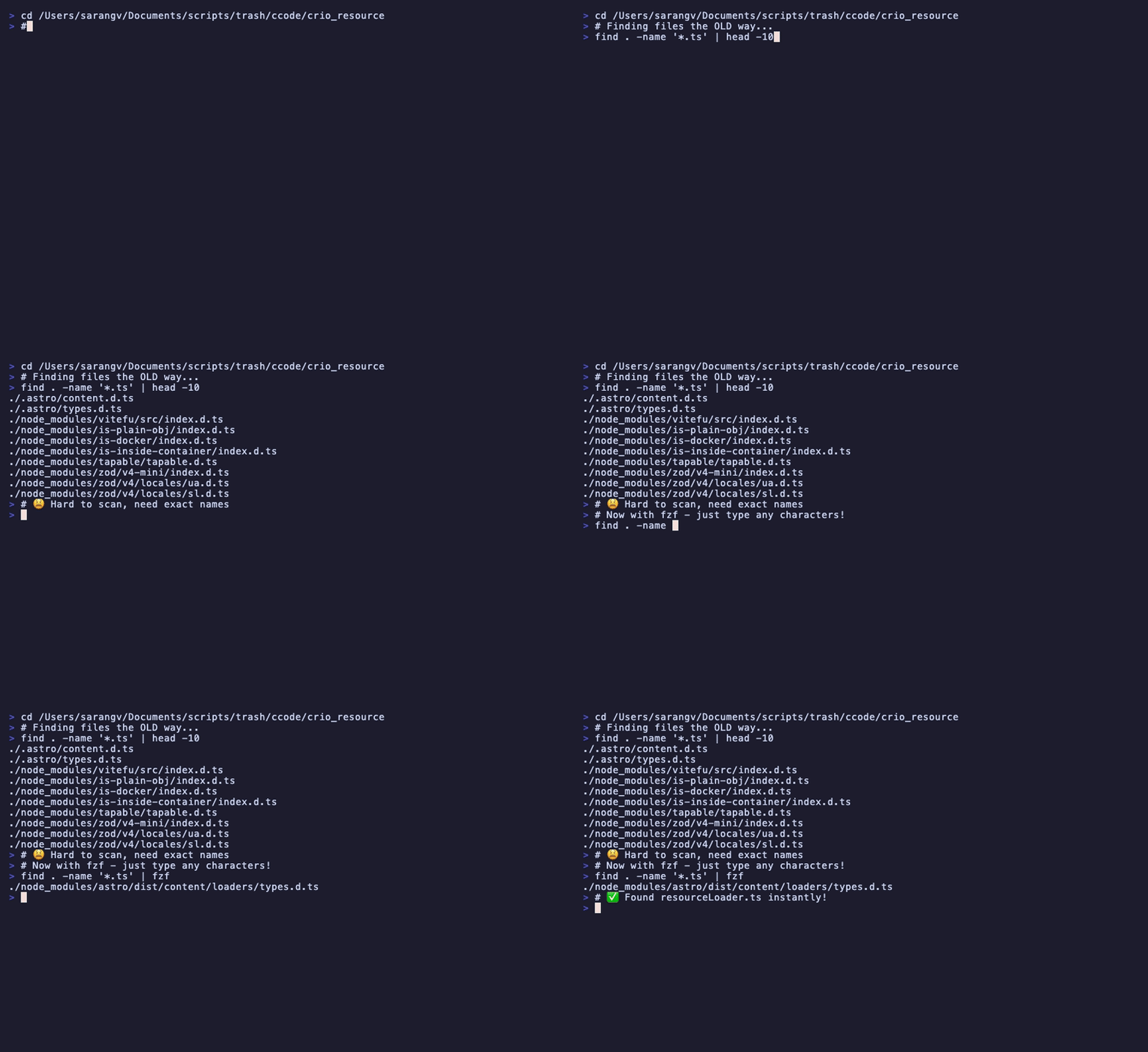
Type partial matches like "loadres" to instantly find resourceLoader.ts
The Pain vs The Solution
Without fzf
find . -name "*.tsx" | xargs grep "useState" | head -20
# Scroll through output...
# Squint at paths...
# Copy path manually...
# Repeat for every search 😫With fzf
rg -l useState | fzf --preview 'bat {}'
# Type "hook" to filter
# See preview instantly
# Press Enter, done! ✨
Key Features
File Search
Find any file in your project instantly with Ctrl+T. Works with millions of files.
History Search
Replace Ctrl+R with fuzzy history search. Find that command you ran last week in seconds.
Process Killer
Fuzzy search running processes and kill them interactively. No more ps aux | grep.
Git Integration
Checkout branches, view commits, and stage files with fuzzy selection.
Killer Use Cases
These are the commands that will change your daily workflow:
Open files in VS Code (most common!)
# Open any file in VS Code
code $(fzf)

# With preview
code $(fzf --preview 'bat --color=always {}')
Docker container management
# Tail logs from a container
docker logs -f $(docker ps --format '{{.Names}}' | fzf)

# Exec into a container
docker exec -it $(docker ps --format '{{.Names}}' | fzf) /bin/sh

# Stop a container
docker stop $(docker ps --format '{{.Names}}' | fzf)
SSH into servers
# SSH from your config file
ssh $(grep "Host " ~/.ssh/config | awk '{print $2}' | fzf)
npm scripts
# Run any npm script interactively
npm run $(jq -r '.scripts | keys[]' package.json | fzf)
Kubernetes pods
# Tail pod logs
kubectl logs -f $(kubectl get pods -o name | fzf)

# Exec into pod
kubectl exec -it $(kubectl get pods -o name | fzf) -- /bin/sh

# Describe pod
kubectl describe $(kubectl get pods -o name | fzf)
Git operations
# Checkout any branch (local + remote)
git checkout $(git branch -a | fzf | sed 's/remotes\/origin\///' | xargs)

# Cherry-pick a commit
git cherry-pick $(git log --oneline | fzf | awk '{print $1}')

# Show diff for a commit
git show $(git log --oneline | fzf | awk '{print $1}')

# Apply a stash
git stash apply $(git stash list | fzf | cut -d: -f1)
Copy-Paste .zshrc Config
Drop this into your ~/.zshrc for a production-ready fzf setup:
# ===== FZF Configuration =====

# Use fd instead of find (much faster, respects .gitignore)
export FZF_DEFAULT_COMMAND='fd --type f --hidden --follow --exclude .git'
export FZF_CTRL_T_COMMAND="$FZF_DEFAULT_COMMAND"
export FZF_ALT_C_COMMAND='fd --type d --hidden --follow --exclude .git'

# Default options: preview, layout, colors
export FZF_DEFAULT_OPTS='
  --height 60%
  --border rounded
  --layout reverse
  --info inline
  --preview "bat --color=always --style=numbers --line-range=:300 {}"
  --preview-window right:60%:wrap
  --bind "ctrl-d:preview-page-down"
  --bind "ctrl-u:preview-page-up"
  --bind "ctrl-y:execute-silent(echo {} | pbcopy)"
  --color=bg+:#313244,bg:#1e1e2e,spinner:#f5e0dc,hl:#f38ba8
  --color=fg:#cdd6f4,header:#f38ba8,info:#cba6f7,pointer:#f5e0dc
  --color=marker:#f5e0dc,fg+:#cdd6f4,prompt:#cba6f7,hl+:#f38ba8
'

# ===== Useful Aliases =====

# Open file in VS Code
alias vf='code $(fzf)'

# Kill process
alias fkill='ps aux | fzf --height 40% | awk "{print \$2}" | xargs kill -9'

# Git checkout branch
alias fco='git checkout $(git branch -a | fzf | sed "s/remotes\/origin\///" | xargs)'

# Git log browser
alias flog='git log --oneline | fzf --preview "git show {1}" | awk "{print \$1}" | xargs git show'

# Docker logs
alias dlogs='docker logs -f $(docker ps --format "{{.Names}}" | fzf)'

# npm run scripts
alias fnpm='npm run $(jq -r ".scripts | keys[]" package.json | fzf)'
Cheatsheet
Essential keyboard shortcuts (after installing shell integration):
| Shortcut | Action | Description |
|---|---|---|
Ctrl+R |
History Search | Fuzzy search through command history |
Ctrl+T |
File Search | Find files and paste path at cursor |
Alt+C |
Directory Jump | Fuzzy find and cd into directory |
Tab |
Multi-Select | Select multiple items (process all at once) |
'pattern |
Exact Match | Prefix with ' for exact string match |
!pattern |
Exclude | Exclude matches containing pattern |
^pattern |
Starts With | Match items starting with pattern |
pattern$ |
Ends With | Match items ending with pattern |
Troubleshooting
Ctrl+R not working?
Shell integration not installed. Run: $(brew --prefix)/opt/fzf/install and restart your terminal.
fzf is slow on large repos?
Use fd instead of find. Install with brew install fd and set FZF_DEFAULT_COMMAND (see config above).
No preview showing?
Install bat for syntax-highlighted previews: brew install bat
Getting Started
-
1
Install fzf + friends
brew install fzf fd bat -
2
Install shell integration
$(brew --prefix)/opt/fzf/install -
3
Add config to ~/.zshrc
Copy the configuration block from above
-
4
Restart terminal & try it!
Press
Ctrl+Rfor history,Ctrl+Tfor files
Transform Your Terminal Today
Stop typing exact paths and scrolling through history. Install fzf and find anything instantly.
View on GitHub