Setting Up Selenium 4
What's New in Selenium 4
Selenium 4 (current version: 4.33.0 as of May 2025) brought significant improvements:
| Feature | What It Means |
|---|---|
| W3C WebDriver Protocol | Standardized browser communication |
| Chrome DevTools Protocol (CDP) | Network interception, performance metrics |
| WebDriver BiDi | Real-time bidirectional communication |
| Relative Locators | "Find element near/below/above another" |
| Better Documentation | Finally! |
Architecture Overview
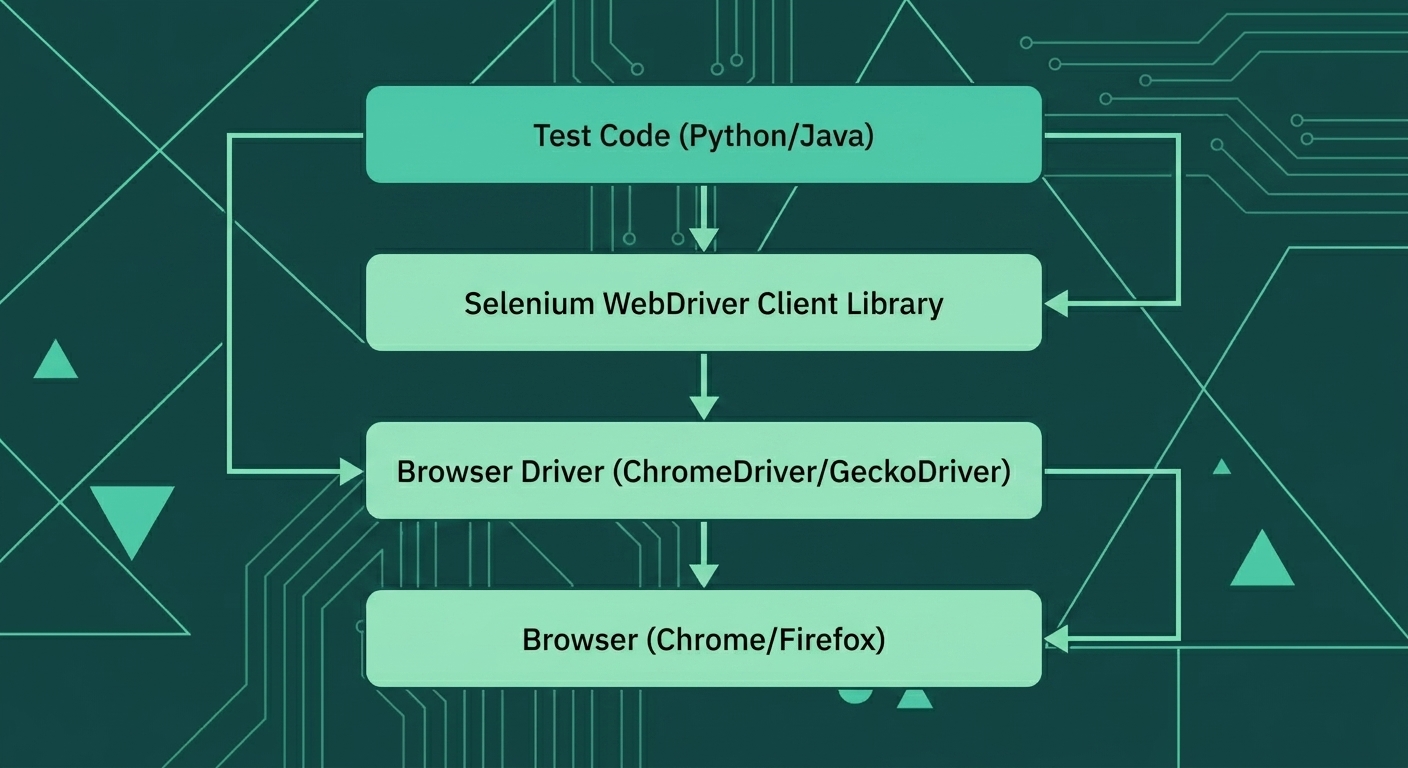
Your test code communicates through the Selenium WebDriver client library, which sends HTTP/WebSocket commands to the browser driver (ChromeDriver, GeckoDriver), which in turn controls the actual browser.
Option 1: Python Setup (Recommended for Beginners)
Step 1: Install Python
# Verify Python is installed (3.8+ required)
python --version

# If not installed, download from python.org
Step 2: Create Project Structure
# Create project directory
mkdir ecommerce-tests
cd ecommerce-tests

# Create virtual environment
python -m venv venv

# Activate virtual environment
# On macOS/Linux:
source venv/bin/activate
# On Windows:
venv\Scripts\activate

# Create project structure
mkdir -p tests pages utils
touch pytest.ini requirements.txt
Step 3: Install Dependencies
# requirements.txt
selenium>=4.20.0
pytest>=8.0.0
webdriver-manager>=4.0.0
python-dotenv>=1.0.0
pip install -r requirements.txtStep 4: First Test
# tests/test_first.py
from selenium import webdriver
from selenium.webdriver.chrome.service import Service
from webdriver_manager.chrome import ChromeDriverManager
from selenium.webdriver.common.by import By

def test_homepage_loads():
    # Selenium 4: WebDriver Manager handles driver installation
    driver = webdriver.Chrome(
        service=Service(ChromeDriverManager().install())
    )

    try:
        # Navigate to a demo e-commerce site
        driver.get("https://www.saucedemo.com")

        # Verify page loaded
        assert "Swag Labs" in driver.title

        # Find login elements exist
        username = driver.find_element(By.ID, "user-name")
        password = driver.find_element(By.ID, "password")
        login_btn = driver.find_element(By.ID, "login-button")

        assert username.is_displayed()
        assert password.is_displayed()
        assert login_btn.is_displayed()

        print("✅ Homepage loaded successfully!")

    finally:
        driver.quit()

if __name__ == "__main__":
    test_homepage_loads()
Step 5: Run the Test
# Run with pytest
pytest tests/test_first.py -v

# Or run directly
python tests/test_first.py
Option 2: Java Setup
Step 1: Create Maven Project
<!-- pom.xml -->
<?xml version="1.0" encoding="UTF-8"?>
<project xmlns="http://maven.apache.org/POM/4.0.0"
         xmlns:xsi="http://www.w3.org/2001/XMLSchema-instance"
         xsi:schemaLocation="http://maven.apache.org/POM/4.0.0
         http://maven.apache.org/xsd/maven-4.0.0.xsd">
    <modelVersion>4.0.0</modelVersion>

    <groupId>com.ecommerce</groupId>
    <artifactId>selenium-tests</artifactId>
    <version>1.0-SNAPSHOT</version>

    <properties>
        <maven.compiler.source>17</maven.compiler.source>
        <maven.compiler.target>17</maven.compiler.target>
        <selenium.version>4.20.0</selenium.version>
        <testng.version>7.9.0</testng.version>
    </properties>

    <dependencies>
        <dependency>
            <groupId>org.seleniumhq.selenium</groupId>
            <artifactId>selenium-java</artifactId>
            <version>${selenium.version}</version>
        </dependency>
        <dependency>
            <groupId>org.testng</groupId>
            <artifactId>testng</artifactId>
            <version>${testng.version}</version>
            <scope>test</scope>
        </dependency>
        <dependency>
            <groupId>io.github.bonigarcia</groupId>
            <artifactId>webdrivermanager</artifactId>
            <version>5.8.0</version>
        </dependency>
    </dependencies>
</project>
Step 2: First Test in Java
// src/test/java/com/ecommerce/FirstTest.java
package com.ecommerce;

import io.github.bonigarcia.wdm.WebDriverManager;
import org.openqa.selenium.By;
import org.openqa.selenium.WebDriver;
import org.openqa.selenium.WebElement;
import org.openqa.selenium.chrome.ChromeDriver;
import org.testng.Assert;
import org.testng.annotations.AfterMethod;
import org.testng.annotations.BeforeMethod;
import org.testng.annotations.Test;

public class FirstTest {
    private WebDriver driver;

    @BeforeMethod
    public void setup() {
        WebDriverManager.chromedriver().setup();
        driver = new ChromeDriver();
    }

    @Test
    public void testHomepageLoads() {
        driver.get("https://www.saucedemo.com");

        Assert.assertTrue(driver.getTitle().contains("Swag Labs"));

        WebElement username = driver.findElement(By.id("user-name"));
        WebElement password = driver.findElement(By.id("password"));
        WebElement loginBtn = driver.findElement(By.id("login-button"));

        Assert.assertTrue(username.isDisplayed());
        Assert.assertTrue(password.isDisplayed());
        Assert.assertTrue(loginBtn.isDisplayed());
    }

    @AfterMethod
    public void teardown() {
        if (driver != null) {
            driver.quit();
        }
    }
}
Project Structure Best Practice
ecommerce-tests/
├── pages/                 # Page Object classes
│   ├── __init__.py
│   ├── base_page.py
│   ├── login_page.py
│   ├── products_page.py
│   ├── cart_page.py
│   └── checkout_page.py
├── tests/                 # Test files
│   ├── __init__.py
│   ├── conftest.py        # Pytest fixtures
│   ├── test_login.py
│   ├── test_cart.py
│   └── test_checkout.py
├── utils/                 # Helper utilities
│   ├── __init__.py
│   ├── config.py
│   └── test_data.py
├── reports/               # Test reports (gitignored)
├── screenshots/           # Failure screenshots (gitignored)
├── pytest.ini             # Pytest configuration
├── requirements.txt       # Python dependencies
└── .env                   # Environment variables (gitignored)
Configuration File
# utils/config.py
import os
from dotenv import load_dotenv

load_dotenv()

class Config:
    BASE_URL = os.getenv("BASE_URL", "https://www.saucedemo.com")
    BROWSER = os.getenv("BROWSER", "chrome")
    HEADLESS = os.getenv("HEADLESS", "false").lower() == "true"
    IMPLICIT_WAIT = int(os.getenv("IMPLICIT_WAIT", "10"))
    EXPLICIT_WAIT = int(os.getenv("EXPLICIT_WAIT", "20"))
# .env
BASE_URL=https://www.saucedemo.com
BROWSER=chrome
HEADLESS=false
IMPLICIT_WAIT=10
EXPLICIT_WAIT=20Pytest Fixtures (Python)
# tests/conftest.py
import pytest
from selenium import webdriver
from selenium.webdriver.chrome.service import Service
from selenium.webdriver.chrome.options import Options
from webdriver_manager.chrome import ChromeDriverManager
from utils.config import Config

@pytest.fixture(scope="function")
def driver():
    """Create WebDriver instance for each test"""
    options = Options()

    if Config.HEADLESS:
        options.add_argument("--headless")

    options.add_argument("--no-sandbox")
    options.add_argument("--disable-dev-shm-usage")
    options.add_argument("--window-size=1920,1080")

    driver = webdriver.Chrome(
        service=Service(ChromeDriverManager().install()),
        options=options
    )

    driver.implicitly_wait(Config.IMPLICIT_WAIT)

    yield driver

    driver.quit()

@pytest.fixture(scope="function")
def logged_in_driver(driver):
    """Provide a driver that's already logged in"""
    driver.get(Config.BASE_URL)
    driver.find_element("id", "user-name").send_keys("standard_user")
    driver.find_element("id", "password").send_keys("secret_sauce")
    driver.find_element("id", "login-button").click()

    yield driver
Running Tests
# Run all tests
pytest

# Run with verbose output
pytest -v

# Run specific test file
pytest tests/test_login.py

# Run tests matching a pattern
pytest -k "checkout"

# Run and generate HTML report
pytest --html=reports/report.html

# Run in parallel (requires pytest-xdist)
pytest -n auto
Common Setup Issues
| Issue | Solution |
|---|---|
| ChromeDriver version mismatch | Use WebDriverManager—it handles this |
| Permission denied on Linux | chmod +x the driver, or use WebDriverManager |
| Element not found immediately | Add waits (next lesson) |
| Browser opens then closes | Check for errors in test, ensure quit() is in finally |
Key Takeaways
- Use WebDriverManager - Don't manually download drivers
- Virtual environments - Isolate project dependencies
- Project structure matters - Set it up right from the start
- Configuration externalization - Use environment variables
- Fixtures for reusability - Don't repeat setup/teardown code
Next Lesson
Now that we can run tests, let's learn Locator Strategies for E-Commerce—how to find elements reliably without creating brittle tests.