Why Playwright in 2026
Selenium dominated web testing for 15+ years. Then Playwright arrived and changed everything. Understanding why helps you make better testing decisions.
The Flaky Test Problem
Every QA engineer knows the pain: tests that pass locally but fail in CI. Tests that fail Monday morning but pass after a retry. This is the flaky test epidemic.
A 2023 Google study found that 16% of tests in large codebases are flaky. For e-commerce sites with complex async behavior (loading products, updating carts, processing payments), that number climbs higher.
| Framework | Flaky Test Rate | Source |
|---|---|---|
| Selenium WebDriver | 23% of CI failures | Microsoft Research 2023 |
| Playwright | 6.4% of CI failures | Same study |
That's 3.6x fewer flaky tests with Playwright. But why?
Architecture: The Root Difference
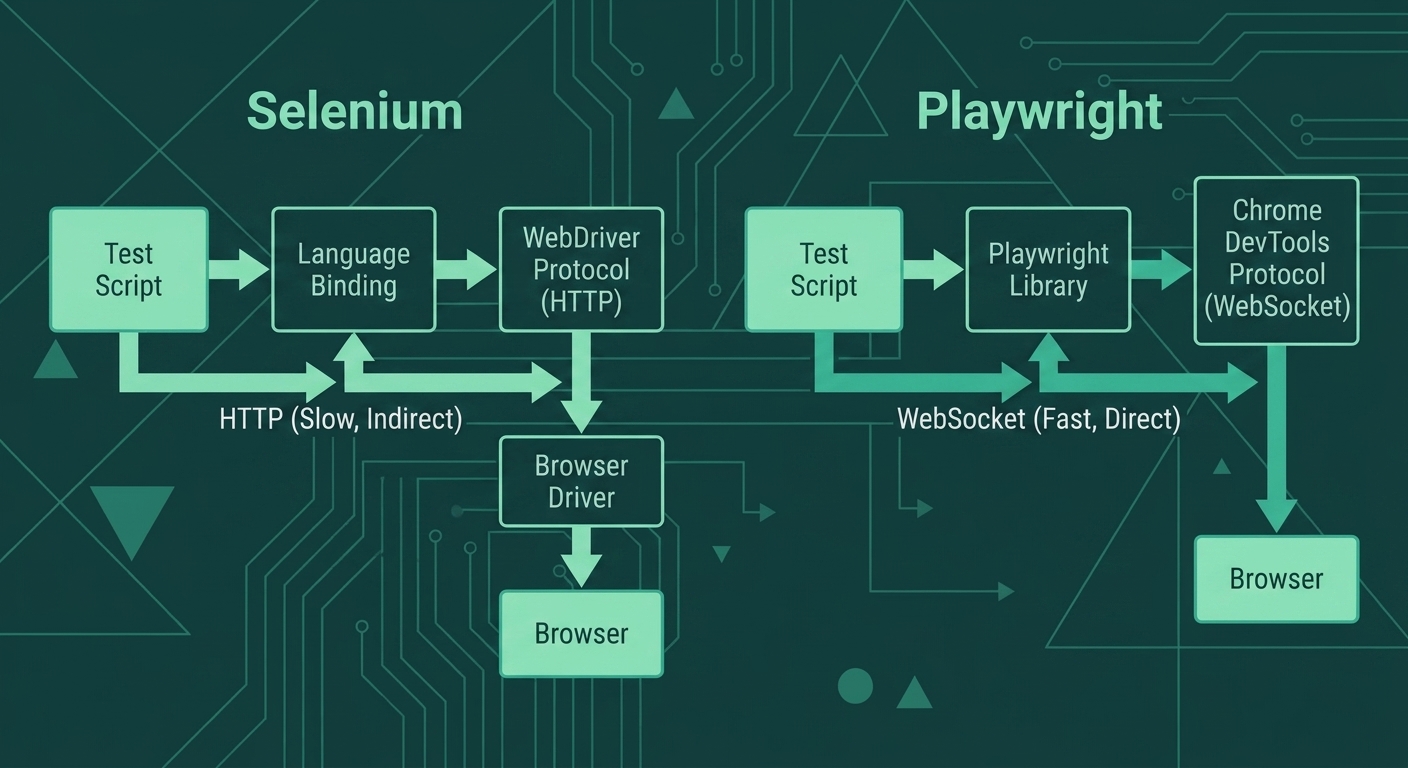 Selenium sends commands via HTTP to a WebDriver server, which then talks to the browser. Every command is a round-trip request-response cycle.
Playwright connects directly to the browser via the Chrome DevTools Protocol (CDP) over WebSocket. This is a persistent, bidirectional connection.
Selenium sends commands via HTTP to a WebDriver server, which then talks to the browser. Every command is a round-trip request-response cycle.
Playwright connects directly to the browser via the Chrome DevTools Protocol (CDP) over WebSocket. This is a persistent, bidirectional connection.
Why This Matters for E-Commerce Testing
When testing a checkout flow:
Selenium approach:1. Send "click Add to Cart" via HTTP → Wait for response
2. Send "wait for cart update" via HTTP → Wait for response
3. Send "check cart count" via HTTP → Wait for response
4. Send "click checkout" via HTTP → Wait for response
...20+ more round trips1. Click "Add to Cart" (Playwright auto-waits for actionability)
2. Assert cart updated (web-first assertion, auto-retries)
3. Click checkout
...Commands flow over persistent connectionAuto-Wait: The Killer Feature
This is the single biggest reason Playwright tests are more stable.
The Selenium Problem
// Selenium: Manual waiting everywhere
await driver.findElement(By.css('.add-to-cart')).click();
await driver.wait(until.elementLocated(By.css('.cart-count')), 5000);
await driver.wait(until.elementTextIs(
  driver.findElement(By.css('.cart-count')), '1'
), 5000);
What could go wrong?
- Element exists but isn't clickable yet (behind a modal)
- Element is visible but still animating
- Cart count element exists but text hasn't updated
- Network is slow, 5 seconds isn't enough
- Network is fast, you're wasting 4.9 seconds waiting
The Playwright Solution
// Playwright: Auto-wait built in
await page.getByRole('button', { name: 'Add to Cart' }).click();
await expect(page.getByTestId('cart-count')).toHaveText('1');
Playwright automatically waits for:
- Element to be attached to DOM
- Element to be visible (not hidden, not zero-size)
- Element to be stable (not animating)
- Element to be enabled (not disabled)
- Element to receive events (not blocked by another element)
No manual waits. No arbitrary timeouts. No flaky tests.
Feature Comparison
| Feature | Selenium | Playwright |
|---|---|---|
| Auto-wait | Manual waits required | Built-in for all actions |
| Multiple browsers | Requires separate drivers | Single API, all browsers |
| Network mocking | Limited (proxy-based) | Native page.route() |
| API testing | Not built-in | Full request API |
| Screenshots/Video | Basic support | Built-in with trace viewer |
| Mobile emulation | Limited | 100+ device profiles |
| Parallel execution | Test-framework dependent | Native workers |
| Browser contexts | New browser per test | Isolated contexts (fast) |
| Debugging | Browser dev tools | Trace Viewer + Inspector |
When to Choose Selenium
Selenium isn't dead. Choose it when:
1. Legacy system requirementsYour company has 10,000 Selenium tests
Migration cost > Maintenance costSelenium supports browsers Playwright doesn't (Safari on Windows via RemoteWebDriver, older browser versions).
3. Non-JavaScript environmentsSelenium has mature bindings for Java, Python, C#, Ruby. Playwright's Java/Python support is strong but newer.
4. Grid-based testing infrastructureIf you've invested heavily in Selenium Grid, Sauce Labs, or BrowserStack Selenium integration.
When to Choose Playwright
Choose Playwright when:
1. Starting a new projectNo legacy tests to migrate. Start with the modern approach.
2. Flaky tests are costing youIf your team spends hours debugging flaky tests, Playwright's auto-wait pays for the migration.
3. You need API + UI testingPlaywright's request context lets you bypass UI for setup/teardown. Huge time savings for e-commerce tests.
Built-in device emulation for testing responsive e-commerce on iPhone, Android, tablets.
5. You want better debuggingTrace Viewer shows exactly what happened in failed tests. Screenshot, DOM snapshot, network logs, all in one timeline.
Real-World: E-Commerce Migration
A mid-size e-commerce company (anonymous, shared at TestJS Summit 2024) reported:
| Metric | Before (Selenium) | After (Playwright) |
|---|---|---|
| Test suite runtime | 45 minutes | 12 minutes |
| Flaky test rate | 18% | 3% |
| Time to debug failures | 30+ min | 5 min (Trace Viewer) |
| Checkout test reliability | 72% | 98% |
The checkout flow was their biggest pain point. Selenium tests failed on payment processing, shipping calculation updates, and inventory checks. Playwright's auto-wait eliminated most failures.
Career Context
As an SDET, your framework choice matters:
Job market reality (2026):- Playwright job postings: +340% since 2023
- Selenium still leads in total postings (legacy)
- New companies heavily favor Playwright/Cypress
- Locator strategies (CSS, XPath) work in both
- Page Object Model pattern applies to both
- CI/CD integration concepts are framework-agnostic
✓ Strong: "Playwright, Selenium, Cypress" (versatility)
✓ Good: "Playwright specialist" (modern, in-demand)
✗ Risky: "Selenium only" (might seem dated)
Code Preview: Same Test, Both Frameworks
Here's a simple e-commerce test in both frameworks:
Selenium
import { Builder, By, until } from 'selenium-webdriver';

describe('Product Search', () => {
  let driver;

  beforeAll(async () => {
    driver = await new Builder().forBrowser('chrome').build();
  });

  afterAll(async () => {
    await driver.quit();
  });

  test('can search for products', async () => {
    await driver.get('https://shop.example.com');

    const searchBox = await driver.findElement(By.css('[data-testid="search-input"]'));
    await searchBox.sendKeys('wireless headphones');
    await searchBox.submit();

    await driver.wait(
      until.elementLocated(By.css('[data-testid="product-card"]')),
      10000
    );

    const products = await driver.findElements(By.css('[data-testid="product-card"]'));
    expect(products.length).toBeGreaterThan(0);
  });
});
Playwright
import { test, expect } from '@playwright/test';

test('can search for products', async ({ page }) => {
  await page.goto('https://shop.example.com');

  await page.getByTestId('search-input').fill('wireless headphones');
  await page.getByTestId('search-input').press('Enter');

  await expect(page.getByTestId('product-card').first()).toBeVisible();

  const products = await page.getByTestId('product-card').count();
  expect(products).toBeGreaterThan(0);
});
Notice:
- No manual waits in Playwright
- No browser setup/teardown (Playwright handles it)
- Cleaner locator API (
getByTestIdvsfindElement(By.css(...)))
Key Takeaways
- Architecture matters: WebSocket beats HTTP for test stability
- Auto-wait is transformative: 3.6x fewer flaky tests
- Selenium isn't wrong: It's proven, mature, and has its place
- Playwright excels at: Modern apps, async behavior, debugging
- E-commerce specifically: Payment flows, cart updates, inventory checks all benefit from auto-wait
- Career-wise: Learn both, lead with Playwright for new projects
Next Lesson
In the next lesson, we'll install Playwright and write your first e-commerce test. You'll see auto-wait in action immediately.