CI/CD & Parallel Execution
Your test suite has 200 tests. Running them sequentially takes 40 minutes. That's too slow for CI. Let's make it run in 5 minutes.
GitHub Actions Setup
Basic Configuration
# .github/workflows/playwright.yml
name: Playwright Tests

on:
  push:
    branches: [main, develop]
  pull_request:
    branches: [main]

jobs:
  test:
    runs-on: ubuntu-latest
    timeout-minutes: 30

    steps:
      - name: Checkout repository
        uses: actions/checkout@v4

      - name: Setup Node.js
        uses: actions/setup-node@v4
        with:
          node-version: '20'
          cache: 'npm'

      - name: Install dependencies
        run: npm ci

      - name: Install Playwright browsers
        run: npx playwright install --with-deps chromium

      - name: Run Playwright tests
        run: npx playwright test

      - name: Upload test report
        uses: actions/upload-artifact@v4
        if: always()
        with:
          name: playwright-report
          path: playwright-report/
          retention-days: 30

      - name: Upload test results
        uses: actions/upload-artifact@v4
        if: failure()
        with:
          name: test-results
          path: test-results/
          retention-days: 7
Using Playwright's Official Docker Image
jobs:
  test:
    runs-on: ubuntu-latest
    container:
      image: mcr.microsoft.com/playwright:v1.40.0-jammy

    steps:
      - uses: actions/checkout@v4

      - name: Install dependencies
        run: npm ci

      # No need to install browsers - they're in the image
      - name: Run tests
        run: npx playwright test
Parallel Workers
Understanding Workers
Workers run tests in parallel processes:
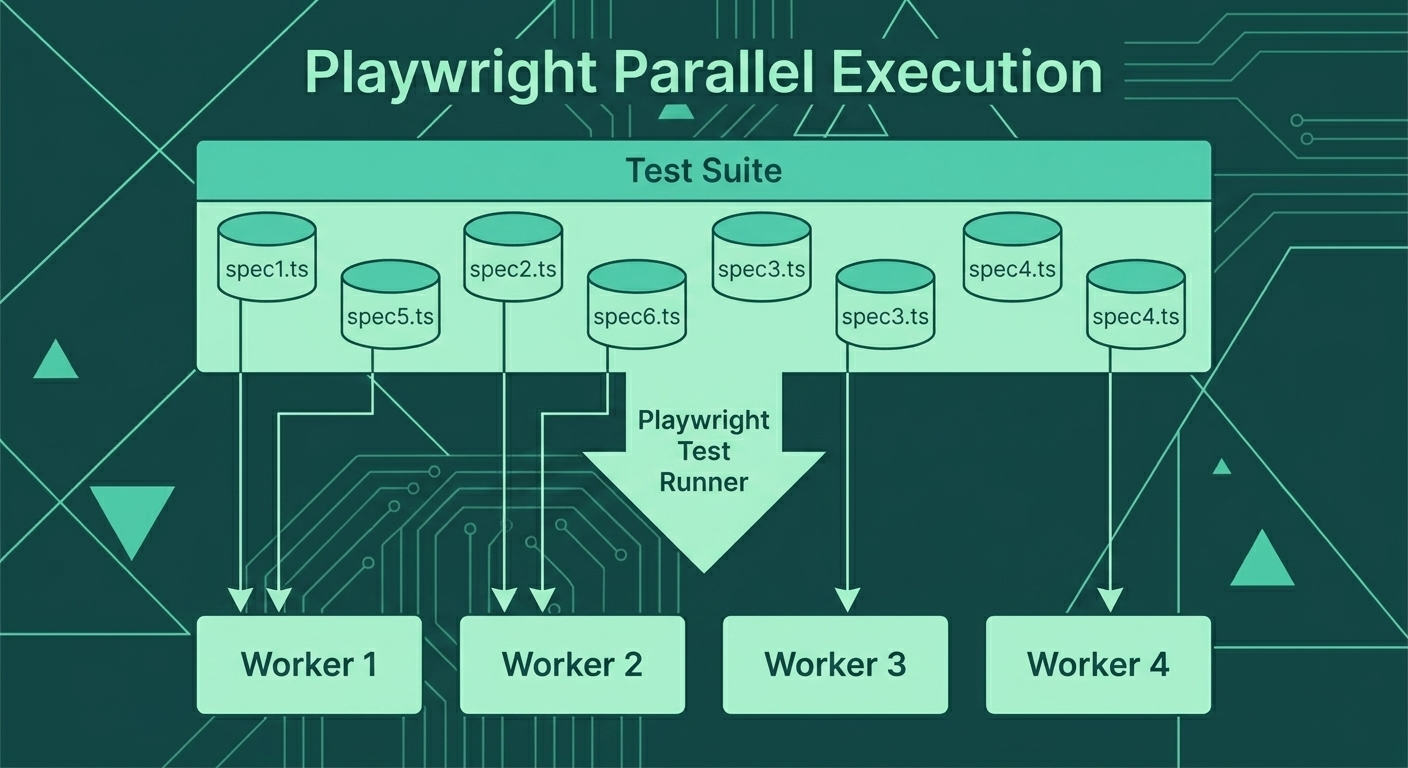
Each worker gets a subset of tests, runs them independently, and results are combined into a single report.
Configuring Workers
// playwright.config.ts
export default defineConfig({
  // Use all available CPU cores locally
  workers: process.env.CI ? 1 : undefined,

  // Or set a specific number
  workers: 4,

  // Or use percentage of CPUs
  workers: '50%',

  // Run tests in files in parallel
  fullyParallel: true,
});
Worker Isolation
Each worker is a separate process with its own browser:
test.describe('Cart Tests', () => {
  // These tests run in parallel (different workers)
  test('add item to cart', async ({ page }) => { /* ... */ });
  test('remove item from cart', async ({ page }) => { /* ... */ });
  test('update quantity', async ({ page }) => { /* ... */ });
});

test.describe.configure({ mode: 'serial' });
test.describe('Checkout Flow', () => {
  // These tests run sequentially (same worker)
  test('fill shipping', async ({ page }) => { /* ... */ });
  test('fill payment', async ({ page }) => { /* ... */ });
  test('confirm order', async ({ page }) => { /* ... */ });
});
Test Sharding
Sharding distributes tests across multiple machines:
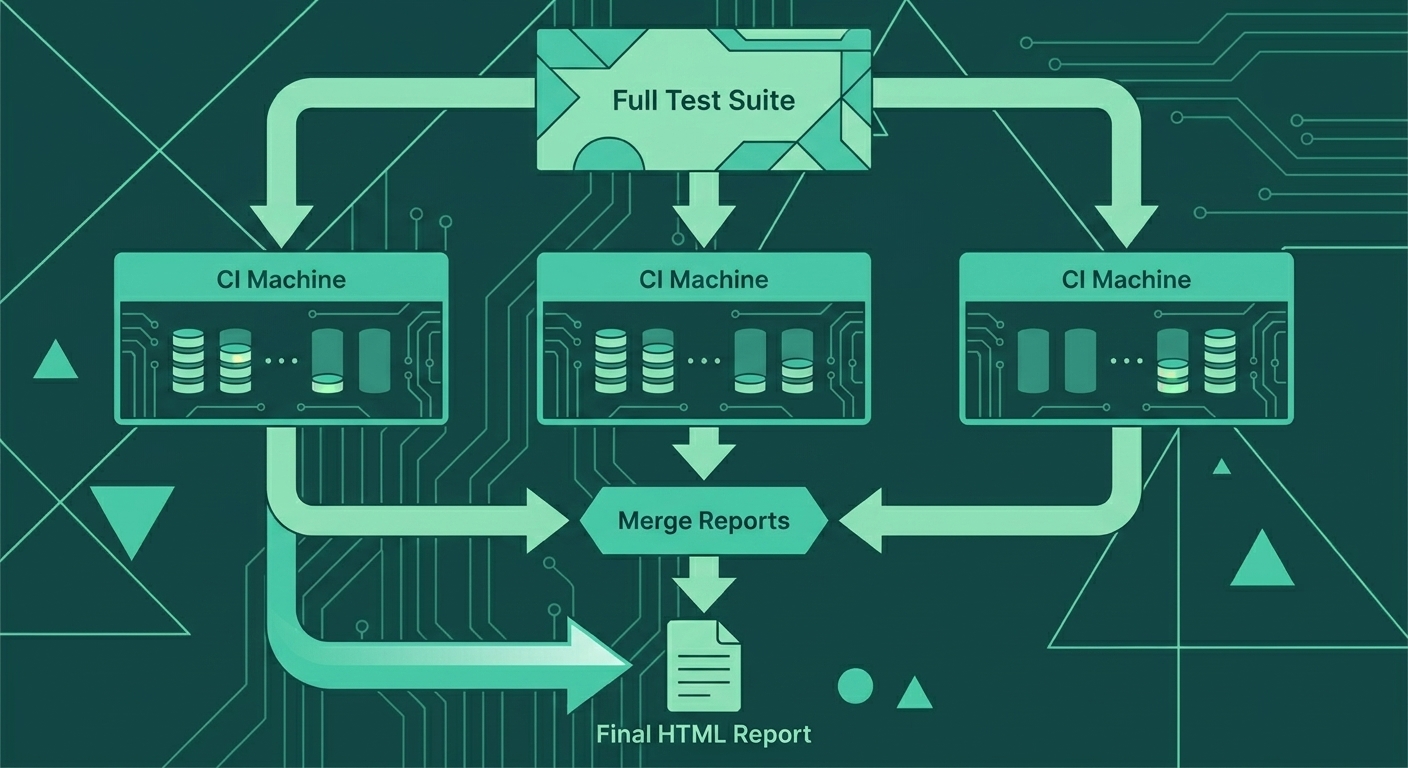
Each machine runs a portion of the test suite (shard), produces a blob report, and all reports are merged into a final HTML report.
Sharding Configuration
# .github/workflows/playwright.yml
jobs:
  test:
    runs-on: ubuntu-latest
    strategy:
      fail-fast: false
      matrix:
        shardIndex: [1, 2, 3, 4]
        shardTotal: [4]

    steps:
      - uses: actions/checkout@v4

      - name: Setup Node.js
        uses: actions/setup-node@v4
        with:
          node-version: '20'
          cache: 'npm'

      - name: Install dependencies
        run: npm ci

      - name: Install Playwright
        run: npx playwright install --with-deps chromium

      - name: Run tests (shard ${{ matrix.shardIndex }}/${{ matrix.shardTotal }})
        run: npx playwright test --shard=${{ matrix.shardIndex }}/${{ matrix.shardTotal }}

      - name: Upload blob report
        uses: actions/upload-artifact@v4
        if: always()
        with:
          name: blob-report-${{ matrix.shardIndex }}
          path: blob-report/
          retention-days: 1
Merging Sharded Reports
  merge-reports:
    needs: test
    runs-on: ubuntu-latest
    if: always()

    steps:
      - uses: actions/checkout@v4

      - name: Setup Node.js
        uses: actions/setup-node@v4
        with:
          node-version: '20'
          cache: 'npm'

      - name: Install dependencies
        run: npm ci

      - name: Download all blob reports
        uses: actions/download-artifact@v4
        with:
          path: all-blob-reports
          pattern: blob-report-*
          merge-multiple: true

      - name: Merge reports
        run: npx playwright merge-reports --reporter html ./all-blob-reports

      - name: Upload merged report
        uses: actions/upload-artifact@v4
        with:
          name: playwright-report
          path: playwright-report/
          retention-days: 30
Enable Blob Reporter
// playwright.config.ts
export default defineConfig({
  reporter: process.env.CI
    ? [['blob'], ['github']]  // Blob for sharding, GitHub for annotations
    : [['html'], ['list']],   // HTML for local development
});
E-Commerce CI Configuration
Complete Production Config
// playwright.config.ts
import { defineConfig, devices } from '@playwright/test';

const isCI = !!process.env.CI;

export default defineConfig({
  testDir: './tests',

  // Parallel execution
  fullyParallel: true,
  workers: isCI ? 1 : undefined,  // 1 worker per shard in CI

  // Fail build if test.only left in code
  forbidOnly: isCI,

  // Retries for flaky tests
  retries: isCI ? 2 : 0,

  // Test timeout
  timeout: 60000,

  // Expect timeout
  expect: {
    timeout: 10000,
  },

  // Reporter
  reporter: isCI
    ? [
        ['blob'],
        ['github'],
        ['json', { outputFile: 'test-results.json' }],
      ]
    : [
        ['html'],
        ['list'],
      ],

  use: {
    // Base URL from environment or default
    baseURL: process.env.BASE_URL || 'https://staging.shop.example.com',

    // Traces for debugging
    trace: 'on-first-retry',

    // Screenshots on failure
    screenshot: 'only-on-failure',

    // Video on failure
    video: 'on-first-retry',

    // Timeouts
    actionTimeout: 15000,
    navigationTimeout: 30000,
  },

  projects: [
    // Setup project for authentication
    {
      name: 'setup',
      testMatch: /.*\.setup\.ts/,
    },

    // Chromium tests (main)
    {
      name: 'chromium',
      use: {
        ...devices['Desktop Chrome'],
        storageState: 'playwright/.auth/user.json',
      },
      dependencies: ['setup'],
    },

    // Firefox (smoke tests only)
    {
      name: 'firefox',
      use: {
        ...devices['Desktop Firefox'],
        storageState: 'playwright/.auth/user.json',
      },
      dependencies: ['setup'],
      grep: /@smoke/,
    },

    // Mobile Chrome
    {
      name: 'mobile-chrome',
      use: {
        ...devices['Pixel 5'],
        storageState: 'playwright/.auth/user.json',
      },
      dependencies: ['setup'],
      grep: /@mobile/,
    },
  ],
});
Test Tagging for Selective Runs
// tests/checkout.spec.ts

// @smoke tag for critical path
test('@smoke checkout completes successfully', async ({ page }) => {
  // This runs in all browsers
});

// @mobile tag for mobile-specific
test('@mobile mobile checkout has sticky CTA', async ({ page }) => {
  // This runs only in mobile-chrome project
});

// Regular test (chromium only by default)
test('can apply promo code', async ({ page }) => {
  // This runs only in chromium
});
Running Tagged Tests
# Run only smoke tests
npx playwright test --grep @smoke

# Run everything except slow tests
npx playwright test --grep-invert @slow

# Run mobile tests
npx playwright test --project=mobile-chrome
CI Best Practices
1. Cache Dependencies
- name: Cache Playwright browsers
  uses: actions/cache@v4
  with:
    path: ~/.cache/ms-playwright
    key: playwright-${{ runner.os }}-${{ hashFiles('**/package-lock.json') }}
2. Run Tests Against Staging
env:
  BASE_URL: ${{ secrets.STAGING_URL }}
  TEST_USER_EMAIL: ${{ secrets.TEST_USER_EMAIL }}
  TEST_USER_PASSWORD: ${{ secrets.TEST_USER_PASSWORD }}
3. Separate Smoke and Full Runs
jobs:
  smoke-tests:
    runs-on: ubuntu-latest
    steps:
      - run: npx playwright test --grep @smoke

  full-tests:
    needs: smoke-tests
    runs-on: ubuntu-latest
    strategy:
      matrix:
        shardIndex: [1, 2, 3, 4]
        shardTotal: [4]
    steps:
      - run: npx playwright test --shard=${{ matrix.shardIndex }}/${{ matrix.shardTotal }}
4. Schedule Nightly Full Runs
on:
  schedule:
    - cron: '0 2 * * *'  # 2 AM UTC daily

jobs:
  nightly-tests:
    runs-on: ubuntu-latest
    steps:
      - run: npx playwright test --project=chromium --project=firefox --project=webkit
5. PR Annotations
- name: Run tests
  run: npx playwright test --reporter=github
This adds inline annotations to PR diffs:
tests/checkout.spec.ts
Line 45: Test failed: "checkout completes" - Timeout waiting for selector
Performance Optimization
Measure Before Optimizing
# See how long each test takes
npx playwright test --reporter=list

# Profile test execution
PWDEBUG=1 npx playwright test --headed
Common Optimizations
| Technique | Impact | When to Use |
|---|---|---|
| API authentication | 3-5s per test | Always |
| API test data setup | 2-10s per test | Always |
| Parallel workers | 2-4x faster | Always |
| Sharding | 4-10x faster | 50+ tests |
| Browser reuse | 1-2s per test | Serial tests |
| Skip visual tests in PR | 30-50% faster | Large suites |
Example: Optimized E-Commerce Suite
Before Optimization:
200 tests × 12s average = 40 minutes (sequential)

After Optimization:
- API auth: saves 4s/test = 13min saved
- API setup: saves 3s/test = 10min saved
- 4 shards × 4 workers = 16x parallelism
- Result: 200 tests in ~5 minutes
Monitoring Test Health
Track Flaky Tests
// playwright.config.ts
export default defineConfig({
  reporter: [
    ['html'],
    ['json', { outputFile: 'results.json' }],
  ],
});
// scripts/analyze-results.js
const results = require('./results.json');
const flaky = results.suites
.flatMap(s => s.specs)
.filter(spec => spec.tests.some(t => t.results.length > 1));
console.log('Flaky tests:', flaky.map(s => s.title));GitHub Actions Job Summary
- name: Generate summary
  if: always()
  run: |
    echo "## Test Results" >> $GITHUB_STEP_SUMMARY
    echo "" >> $GITHUB_STEP_SUMMARY
    npx playwright test --reporter=markdown >> $GITHUB_STEP_SUMMARY
Key Takeaways
- GitHub Actions integrates seamlessly with Playwright
- Workers parallelize within a machine (use all CPUs)
- Sharding distributes across machines (unlimited scale)
- Blob reporter enables report merging from shards
- Tag tests (@smoke, @mobile) for selective runs
- Cache browsers to speed up CI jobs
- API setup eliminates slow UI setup steps
- Monitor flakiness to maintain test reliability
Course Complete
Congratulations! You've learned:
- Why Playwright beats Selenium for modern testing
- Setup and first test with proper configuration
- Locators that survive refactoring
- Auto-wait that eliminates flaky tests
- Page Object Model for maintainable test suites
- API testing for hybrid workflows
- Network mocking for edge case testing
- Visual and mobile testing for comprehensive coverage
- Debugging with Trace Viewer
- CI/CD for fast, reliable test execution
You're ready to build a world-class e-commerce test automation suite. Happy testing!