Arrays
Arrays are the most fundamental data structure in programming. They store elements in contiguous memory locations, allowing instant access to any element using its index.
How Arrays Work
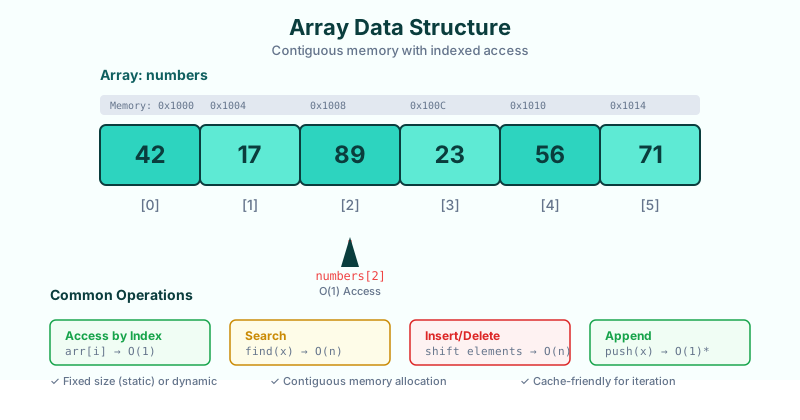
Arrays use a simple formula to access elements:
memory_address = base_address + (index × element_size)This is why access is O(1) — no matter the array size, we can jump directly to any element!
Declaring Arrays
// JavaScript
const numbers = [42, 17, 89, 23, 56, 71];
const fruits = ['apple', 'banana', 'cherry'];

// Access by index (0-based)
console.log(numbers[0]);  // 42
console.log(numbers[2]);  // 89

// Modify element
numbers[1] = 100;
# Python
numbers = [42, 17, 89, 23, 56, 71]
# Access by index
print(numbers[0]) # 42
print(numbers[-1]) # 71 (last element)
# Slicing
print(numbers[1:4]) # [17, 89, 23]Time Complexity Summary
| Operation | Time | Notes |
|---|---|---|
| Access arr[i] | O(1) | Direct calculation |
| Search | O(n) | Must check each element |
| Insert at end | O(1)* | Amortized for dynamic arrays |
| Insert at index | O(n) | Shift elements right |
| Delete at end | O(1) | Just decrease length |
| Delete at index | O(n) | Shift elements left |
Common Array Operations
Traversal
const arr = [1, 2, 3, 4, 5];

// For loop
for (let i = 0; i < arr.length; i++) {
  console.log(arr[i]);
}

// For-of loop
for (const num of arr) {
  console.log(num);
}
Searching
// Linear search - O(n)
function linearSearch(arr, target) {
  for (let i = 0; i < arr.length; i++) {
    if (arr[i] === target) return i;
  }
  return -1;
}

// Built-in methods
arr.indexOf(3);      // Returns index or -1
arr.includes(3);     // Returns true/false
arr.find(x => x > 2); // Returns first match
Insertion & Deletion
const arr = [1, 2, 3, 4, 5];

// Add to end - O(1)
arr.push(6);         // [1, 2, 3, 4, 5, 6]

// Remove from end - O(1)
arr.pop();           // [1, 2, 3, 4, 5]

// Add to beginning - O(n)
arr.unshift(0);      // [0, 1, 2, 3, 4, 5]

// Remove from beginning - O(n)
arr.shift();         // [1, 2, 3, 4, 5]

// Insert at index - O(n)
arr.splice(2, 0, 99); // [1, 2, 99, 3, 4, 5]
When to Use Arrays
Good for:- Storing ordered collections
- Fast access by index
- Iterating through all elements
- When size is known or mostly fixed
- Frequent insertions/deletions in middle
- Unknown or highly variable size
- When you need to search frequently (consider Hash Tables)
Static vs Dynamic Arrays
| Type | Size | Memory | Example |
|---|---|---|---|
| Static | Fixed at creation | Pre-allocated | C arrays, Java arrays |
| Dynamic | Grows automatically | Reallocates when full | JS Array, Python list, ArrayList |
Dynamic arrays typically double in size when full, giving amortized O(1) append.
What's Next?
Next, we'll explore Stacks — a data structure that restricts access to only the top element, perfect for undo operations and parsing expressions.