Two-Agent Architecture Pattern
The Two-Agent Design
Anthropic's first harness pattern uses two specialized agents:
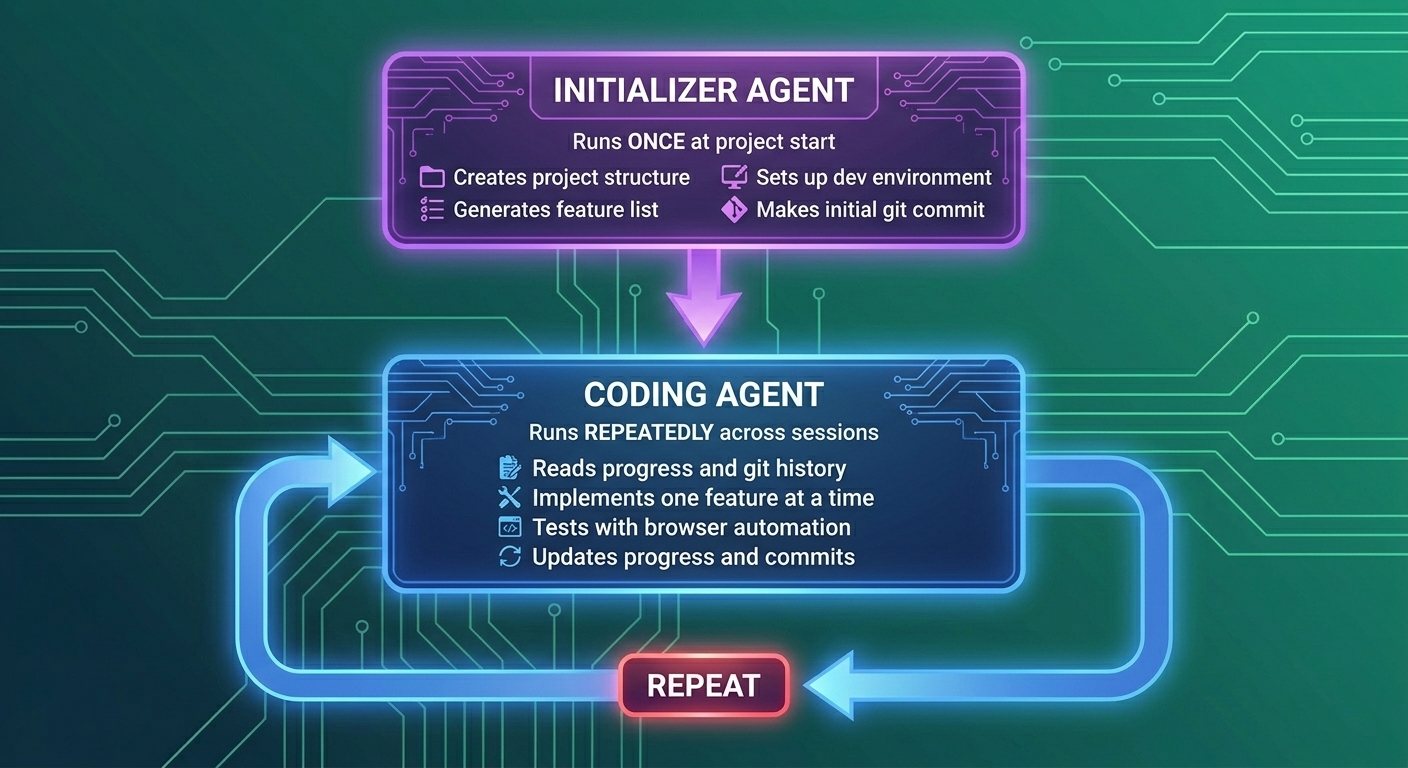
Why Two Agents?
Single-agent problems:- Setup and implementation require different mindsets
- Setup is one-time; implementation is iterative
- Mixing concerns leads to confusion
- Clear separation of concerns
- Initializer creates consistent starting points
- Coder can focus purely on implementation
The Initializer Agent
The initializer runs exactly once and creates the foundation:
Responsibilities
interface InitializerAgent {
  // Create project structure
  setupProject(config: ProjectConfig): Promise<void>;

  // Generate comprehensive feature list
  createFeatureList(requirements: string): Promise<FeatureList>;

  // Set up development environment
  configureEnvironment(): Promise<void>;

  // Create initial git commit
  initializeGit(): Promise<void>;
}
Implementation
async function runInitializer(projectName: string, requirements: string) {
  console.log('🚀 Initializer Agent Starting...');

  // 1. Create project structure
  await bash(`mkdir -p ${projectName}`);
  await bash(`cd ${projectName} && npm create vite@latest . -- --template react-ts`);

  // 2. Install dependencies
  await bash(`cd ${projectName} && npm install`);
  await bash(`cd ${projectName} && npm install tailwindcss postcss autoprefixer`);

  // 3. Create init.sh script for future sessions
  await writeFile(`${projectName}/init.sh`, `#!/bin/bash
npm install
npm run dev &
echo "Development server started on http://localhost:5173"
`);

  // 4. Generate feature list from requirements
  const featureList = await generateFeatureList(requirements);
  await writeFile(
    `${projectName}/feature-list.json`,
    JSON.stringify(featureList, null, 2)
  );

  // 5. Create progress tracking file
  await writeFile(`${projectName}/claude-progress.txt`, `# Project Progress

## Initialization - ${new Date().toISOString()}
- Project created with Vite + React + TypeScript
- Dependencies installed
- Feature list generated with ${featureList.length} features

## Next Session
Start with feature: ${featureList[0].description}
`);

  // 6. Initialize git
  await bash(`cd ${projectName} && git init`);
  await bash(`cd ${projectName} && git add .`);
  await bash(`cd ${projectName} && git commit -m "Initial project setup"`);

  console.log('✅ Initializer Agent Complete');
}
Feature List Structure
The feature list is critical for preventing premature completion:
{
  "features": [
    {
      "id": "auth-001",
      "category": "functional",
      "description": "User can register with email and password",
      "steps": [
        "Create registration form UI",
        "Add form validation",
        "Create /api/auth/register endpoint",
        "Hash password with bcrypt",
        "Store user in database",
        "Send confirmation email"
      ],
      "passes": false,
      "priority": 1
    },
    {
      "id": "auth-002",
      "category": "functional",
      "description": "User can login with email and password",
      "steps": [
        "Create login form UI",
        "Add form validation",
        "Create /api/auth/login endpoint",
        "Generate JWT token",
        "Return token to client",
        "Store token in localStorage"
      ],
      "passes": false,
      "priority": 2
    }
  ]
}passes field. They cannot delete features or add new ones without explicit permission.
The Coding Agent
The coding agent runs repeatedly across multiple sessions:
Session Startup Sequence
async function codingAgentStartup(projectDir: string) {
  // 1. Verify working directory
  const cwd = await bash('pwd');
  if (!cwd.includes(projectDir)) {
    await bash(`cd ${projectDir}`);
  }

  // 2. Read progress from previous sessions
  const progress = await readFile('claude-progress.txt');
  console.log('📖 Previous progress loaded');

  // 3. Review git history
  const gitLog = await bash('git log --oneline -10');
  console.log('📜 Git history reviewed');

  // 4. Load feature list
  const features = JSON.parse(await readFile('feature-list.json'));

  // 5. Find highest priority incomplete feature
  const nextFeature = features.features
    .filter(f => !f.passes)
    .sort((a, b) => a.priority - b.priority)[0];

  // 6. Start development server
  await bash('bash init.sh');

  return {
    progress,
    gitLog,
    features,
    currentFeature: nextFeature
  };
}
Implementation Loop
async function codingAgentSession(context: SessionContext) {
  const { currentFeature, features } = context;

  if (!currentFeature) {
    console.log('🎉 All features complete!');
    return;
  }

  console.log(`🔨 Working on: ${currentFeature.description}`);

  // 1. Implement the feature
  for (const step of currentFeature.steps) {
    console.log(`  📝 Step: ${step}`);
    await implementStep(step, currentFeature);
  }

  // 2. Test with browser automation
  const testResult = await runBrowserTests(currentFeature);

  // 3. Update feature status
  if (testResult.passed) {
    currentFeature.passes = true;
    await writeFile('feature-list.json', JSON.stringify(features, null, 2));
    console.log(`✅ Feature complete: ${currentFeature.description}`);
  } else {
    console.log(`❌ Tests failed: ${testResult.errors.join(', ')}`);
    // Don't mark as complete - will retry next session
  }

  // 4. Update progress file
  await appendToProgress(`
## Session ${new Date().toISOString()}
- Worked on: ${currentFeature.description}
- Status: ${testResult.passed ? 'COMPLETE' : 'IN PROGRESS'}
- Tests: ${testResult.passed ? 'All passed' : testResult.errors.join(', ')}
`);

  // 5. Commit changes
  await bash('git add .');
  await bash(`git commit -m "feat: ${currentFeature.description}"`);
}
Handling Agent Handoffs
The transition from initializer to coder must be clean:
interface HandoffDocument {
  // What the initializer created
  projectStructure: string[];
  installedDependencies: string[];

  // Configuration for the coder
  devServerCommand: string;
  testCommand: string;

  // What to work on
  featureListPath: string;
  progressFilePath: string;

  // How to verify
  browserTestsEnabled: boolean;
  testUrl: string;
}

// Created by Initializer, read by Coder
const handoff: HandoffDocument = {
  projectStructure: ['src/', 'public/', 'tests/'],
  installedDependencies: ['react', 'vite', 'tailwindcss'],
  devServerCommand: 'npm run dev',
  testCommand: 'npm run test',
  featureListPath: './feature-list.json',
  progressFilePath: './claude-progress.txt',
  browserTestsEnabled: true,
  testUrl: 'http://localhost:5173'
};
E-Commerce Harness Example
Let's build a complete two-agent harness for e-commerce:
Project Structure
ecommerce-harness/
├── agents/
│   ├── initializer.ts
│   └── coder.ts
├── shared/
│   ├── types.ts
│   ├── git-helpers.ts
│   └── browser-tests.ts
├── templates/
│   ├── feature-list-ecommerce.json
│   └── init-script.sh
└── harness.ts
Main Harness Entry Point
// harness.ts
import { runInitializer } from './agents/initializer';
import { runCodingSession } from './agents/coder';
import { checkProjectExists } from './shared/utils';

async function main() {
  const projectName = process.argv[2] || 'my-ecommerce';
  const requirements = process.argv[3] || 'Build an e-commerce store with products, cart, and checkout';

  // Check if project already exists
  const exists = await checkProjectExists(projectName);

  if (!exists) {
    // First run - use initializer
    console.log('🆕 New project - running Initializer Agent');
    await runInitializer(projectName, requirements);
  }

  // Run coding session
  console.log('💻 Running Coding Agent session');
  await runCodingSession(projectName);
}

main().catch(console.error);
Usage
# First run - initializes project
node harness.ts my-store "E-commerce with auth, products, cart, checkout"

# Subsequent runs - continues implementation
node harness.ts my-store

# Each run makes incremental progress on features
Failure Modes and Solutions
| Problem | Symptom | Solution |
|---|---|---|
| Premature completion | Agent says "done" with incomplete features | Strict feature list with boolean passes |
| Lost context | Agent redoes work | Progress file + git history check |
| Broken code | Tests fail after changes | Git revert before continuing |
| Incomplete testing | Bugs in "complete" features | Mandatory browser automation |
| Wrong priority | Agent works on low-priority items | Priority field in feature list |
Key Takeaways
- Two agents with clear roles - Initializer sets up, Coder implements
- Initializer runs once - Creates consistent starting point
- Coder runs repeatedly - Makes incremental progress
- Feature list prevents premature completion - Strict completion criteria
- Progress file enables context recovery - Each session knows what came before
- Git integration enables rollbacks - Safe to experiment
Practice Exercise
Implement a two-agent harness for a blog platform:
- Design the initializer's output (project structure, feature list)
- Design the coder's startup sequence
- Create a feature list with 10 features
- Define the handoff document between agents
Next Lesson
The two-agent pattern works well, but what about complex projects that need planning and evaluation? Next, we'll explore the Three-Agent Architecture with Planner, Generator, and Evaluator agents.