Testing with Browser Automation
Why Browser Automation?
Anthropic's key insight about testing:
> "Agents perform testing using browser automation tools (Puppeteer MCP) rather than unit tests alone, mimicking user workflows."
Unit tests check code correctness. Browser automation checks if the user experience works.
Unit Tests                    Browser Automation
─────────────                 ──────────────────
✓ Function returns value      ✓ User can click button
✓ API returns 200             ✓ Form submits successfully
✓ Database query works        ✓ Page loads without errors
                              ✓ Visual design is correct
                              ✓ Workflow completes end-to-end
Browser Automation for Agents
Architecture
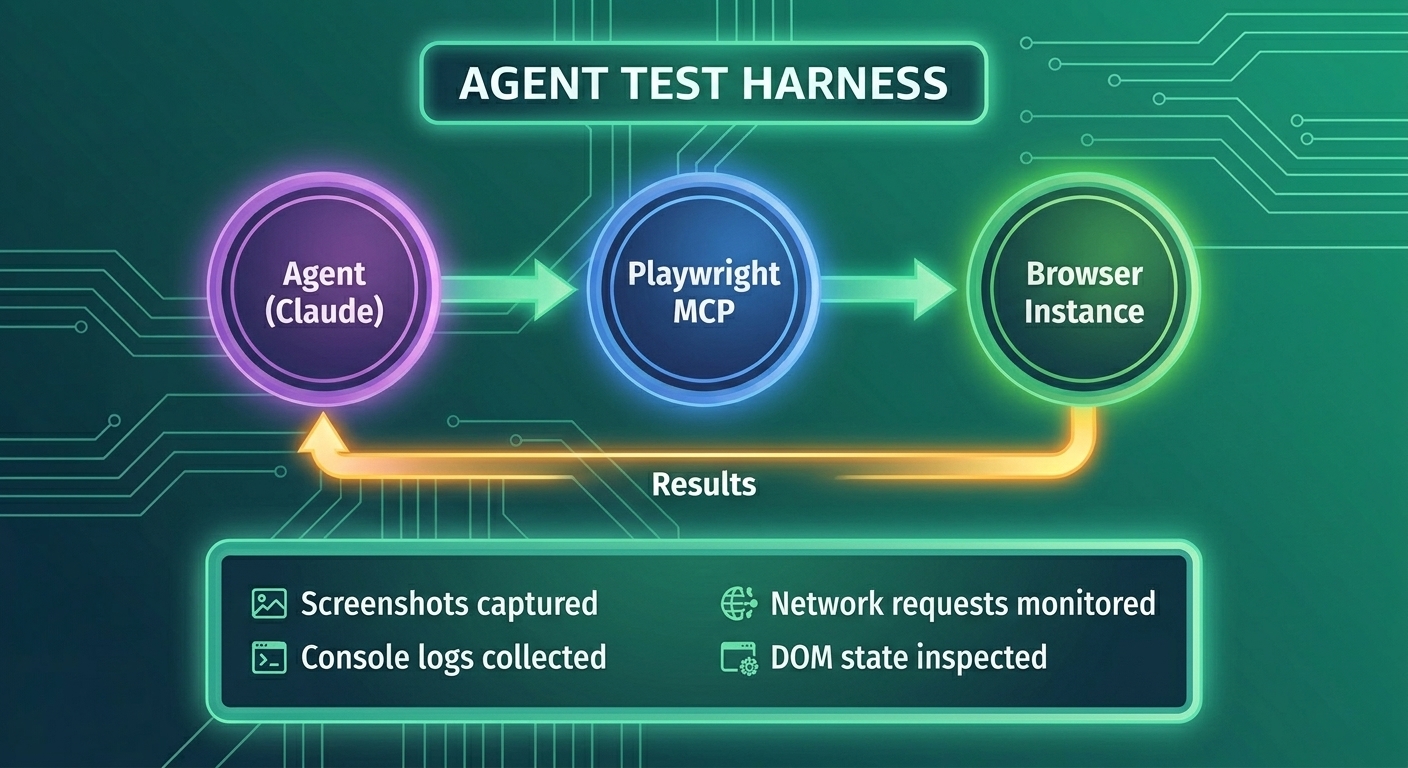
Playwright MCP Server
Claude Code uses Playwright through MCP for browser automation:
// Setting up Playwright MCP for agent testing
import { PlaywrightMCP } from '@anthropic/mcp-playwright';

const playwrightMCP = new PlaywrightMCP({
  headless: true, // Run without visible browser
  screenshotDir: './test-screenshots',
  timeout: 30000
});

// Agent can now use these tools:
// - navigate(url)
// - click(selector)
// - type(selector, text)
// - screenshot()
// - waitForSelector(selector)
// - evaluate(script)
Implementing Agent Tests
Basic Test Structure
interface AgentTest {
  name: string;
  description: string;
  steps: TestStep[];
  expectedOutcome: ExpectedOutcome;
}

interface TestStep {
  action: 'navigate' | 'click' | 'type' | 'wait' | 'screenshot' | 'assert';
  target?: string;
  value?: string;
  timeout?: number;
}

interface ExpectedOutcome {
  pageTitle?: string;
  urlContains?: string;
  elementExists?: string;
  elementText?: { selector: string; text: string };
  noConsoleErrors?: boolean;
}
Test Runner for Agents
class AgentTestRunner {
  private browser: Browser;
  private page: Page;
  private screenshots: string[] = [];
  private consoleMessages: string[] = [];

  async setup() {
    this.browser = await playwright.chromium.launch({ headless: true });
    this.page = await this.browser.newPage();

    // Capture console messages
    this.page.on('console', msg => {
      this.consoleMessages.push(`[${msg.type()}] ${msg.text()}`);
    });

    // Capture errors
    this.page.on('pageerror', error => {
      this.consoleMessages.push(`[ERROR] ${error.message}`);
    });
  }

  async runTest(test: AgentTest): Promise<TestResult> {
    console.log(`🧪 Running: ${test.name}`);

    const results: StepResult[] = [];

    for (const step of test.steps) {
      try {
        const result = await this.executeStep(step);
        results.push({ step, success: true, result });
      } catch (error) {
        results.push({ step, success: false, error: error.message });

        // Take screenshot on failure
        const screenshot = await this.takeScreenshot(`failure-${test.name}`);

        return {
          testName: test.name,
          passed: false,
          stepResults: results,
          failureScreenshot: screenshot,
          consoleMessages: this.consoleMessages
        };
      }
    }

    // Verify expected outcome
    const outcomeResult = await this.verifyOutcome(test.expectedOutcome);

    // Take final screenshot
    const finalScreenshot = await this.takeScreenshot(`final-${test.name}`);

    return {
      testName: test.name,
      passed: outcomeResult.passed,
      stepResults: results,
      outcomeVerification: outcomeResult,
      finalScreenshot,
      consoleMessages: this.consoleMessages
    };
  }

  private async executeStep(step: TestStep): Promise<any> {
    switch (step.action) {
      case 'navigate':
        await this.page.goto(step.value!, { waitUntil: 'networkidle' });
        break;

      case 'click':
        await this.page.click(step.target!);
        break;

      case 'type':
        await this.page.fill(step.target!, step.value!);
        break;

      case 'wait':
        await this.page.waitForSelector(step.target!, {
          timeout: step.timeout || 5000
        });
        break;

      case 'screenshot':
        return await this.takeScreenshot(step.value || 'step');

      case 'assert':
        const element = await this.page.$(step.target!);
        if (!element) {
          throw new Error(`Element not found: ${step.target}`);
        }
        break;
    }
  }

  private async verifyOutcome(expected: ExpectedOutcome): Promise<OutcomeResult> {
    const failures: string[] = [];

    if (expected.pageTitle) {
      const title = await this.page.title();
      if (!title.includes(expected.pageTitle)) {
        failures.push(`Title mismatch: expected "${expected.pageTitle}", got "${title}"`);
      }
    }

    if (expected.urlContains) {
      const url = this.page.url();
      if (!url.includes(expected.urlContains)) {
        failures.push(`URL mismatch: expected to contain "${expected.urlContains}", got "${url}"`);
      }
    }

    if (expected.elementExists) {
      const element = await this.page.$(expected.elementExists);
      if (!element) {
        failures.push(`Element not found: ${expected.elementExists}`);
      }
    }

    if (expected.elementText) {
      const text = await this.page.textContent(expected.elementText.selector);
      if (!text?.includes(expected.elementText.text)) {
        failures.push(`Text mismatch in ${expected.elementText.selector}`);
      }
    }

    if (expected.noConsoleErrors) {
      const errors = this.consoleMessages.filter(m => m.includes('[ERROR]'));
      if (errors.length > 0) {
        failures.push(`Console errors found: ${errors.join(', ')}`);
      }
    }

    return {
      passed: failures.length === 0,
      failures
    };
  }

  private async takeScreenshot(name: string): Promise<string> {
    const path = `./test-screenshots/${name}-${Date.now()}.png`;
    await this.page.screenshot({ path, fullPage: true });
    this.screenshots.push(path);
    return path;
  }

  async teardown() {
    await this.browser.close();
  }
}
E-Commerce Test Examples
Registration Flow Test
const registrationTest: AgentTest = {
  name: 'User Registration',
  description: 'Verify new user can register successfully',
  steps: [
    { action: 'navigate', value: 'http://localhost:5173/register' },
    { action: 'wait', target: 'form[data-testid="register-form"]' },
    { action: 'screenshot', value: 'registration-page-loaded' },
    { action: 'type', target: 'input[name="email"]', value: 'test@example.com' },
    { action: 'type', target: 'input[name="password"]', value: 'SecurePass123!' },
    { action: 'type', target: 'input[name="confirmPassword"]', value: 'SecurePass123!' },
    { action: 'screenshot', value: 'form-filled' },
    { action: 'click', target: 'button[type="submit"]' },
    { action: 'wait', target: '[data-testid="success-message"]', timeout: 10000 },
    { action: 'screenshot', value: 'registration-success' }
  ],
  expectedOutcome: {
    elementExists: '[data-testid="success-message"]',
    noConsoleErrors: true
  }
};
Shopping Cart Test
const addToCartTest: AgentTest = {
  name: 'Add Product to Cart',
  description: 'Verify product can be added to shopping cart',
  steps: [
    { action: 'navigate', value: 'http://localhost:5173/products' },
    { action: 'wait', target: '[data-testid="product-card"]' },
    { action: 'click', target: '[data-testid="product-card"]:first-child' },
    { action: 'wait', target: '[data-testid="product-detail"]' },
    { action: 'screenshot', value: 'product-detail-page' },
    { action: 'click', target: '[data-testid="add-to-cart-btn"]' },
    { action: 'wait', target: '[data-testid="cart-notification"]' },
    { action: 'screenshot', value: 'added-to-cart' },
    { action: 'click', target: '[data-testid="cart-icon"]' },
    { action: 'wait', target: '[data-testid="cart-items"]' },
    { action: 'screenshot', value: 'cart-page' }
  ],
  expectedOutcome: {
    elementExists: '[data-testid="cart-item"]',
    urlContains: '/cart',
    noConsoleErrors: true
  }
};
Checkout Flow Test
const checkoutTest: AgentTest = {
  name: 'Complete Checkout',
  description: 'Verify user can complete purchase',
  steps: [
    // Assume cart has items
    { action: 'navigate', value: 'http://localhost:5173/cart' },
    { action: 'wait', target: '[data-testid="cart-items"]' },
    { action: 'click', target: '[data-testid="checkout-btn"]' },
    { action: 'wait', target: '[data-testid="checkout-form"]' },
    { action: 'screenshot', value: 'checkout-page' },
    // Fill shipping info
    { action: 'type', target: 'input[name="address"]', value: '123 Test St' },
    { action: 'type', target: 'input[name="city"]', value: 'Test City' },
    { action: 'type', target: 'input[name="zip"]', value: '12345' },
    // Fill payment info (test card)
    { action: 'type', target: 'input[name="cardNumber"]', value: '4242424242424242' },
    { action: 'type', target: 'input[name="expiry"]', value: '12/25' },
    { action: 'type', target: 'input[name="cvv"]', value: '123' },
    { action: 'screenshot', value: 'checkout-filled' },
    { action: 'click', target: '[data-testid="place-order-btn"]' },
    { action: 'wait', target: '[data-testid="order-confirmation"]', timeout: 15000 },
    { action: 'screenshot', value: 'order-confirmed' }
  ],
  expectedOutcome: {
    elementExists: '[data-testid="order-confirmation"]',
    elementText: {
      selector: '[data-testid="order-status"]',
      text: 'Order Placed'
    },
    noConsoleErrors: true
  }
};
Visual Regression Testing
Compare screenshots to detect visual changes:
class VisualRegressionTester {
  private baselineDir = './test-baselines';
  private currentDir = './test-screenshots';
  private diffDir = './test-diffs';

  async compareScreenshot(
    testName: string,
    currentPath: string
  ): Promise<VisualComparisonResult> {
    const baselinePath = `${this.baselineDir}/${testName}.png`;

    // Check if baseline exists
    if (!await fileExists(baselinePath)) {
      // First run - save as baseline
      await copyFile(currentPath, baselinePath);
      return {
        status: 'baseline_created',
        message: 'No baseline existed, current screenshot saved as baseline'
      };
    }

    // Compare images
    const diff = await compareImages(baselinePath, currentPath);

    if (diff.percentDifferent > 0.1) { // More than 0.1% different
      // Save diff image
      const diffPath = `${this.diffDir}/${testName}-diff.png`;
      await diff.saveDiffImage(diffPath);

      return {
        status: 'visual_regression',
        percentDifferent: diff.percentDifferent,
        diffImagePath: diffPath,
        message: `Visual regression detected: ${diff.percentDifferent.toFixed(2)}% different`
      };
    }

    return {
      status: 'match',
      percentDifferent: diff.percentDifferent,
      message: 'Screenshots match within tolerance'
    };
  }
}
Integrating with Agent Workflow
async function evaluatorWithBrowserTests(
  implementation: Implementation,
  contract: SprintContract
): Promise<EvaluationResult> {
  const testRunner = new AgentTestRunner();
  const visualTester = new VisualRegressionTester();

  await testRunner.setup();

  try {
    // Run all behavior tests
    const testResults: TestResult[] = [];

    for (const behavior of contract.behaviors) {
      const test = behaviorToTest(behavior);
      const result = await testRunner.runTest(test);
      testResults.push(result);

      // Visual regression check
      if (result.finalScreenshot) {
        const visualResult = await visualTester.compareScreenshot(
          behavior.id,
          result.finalScreenshot
        );
        result.visualRegression = visualResult;
      }
    }

    // Calculate overall score
    const passedTests = testResults.filter(r => r.passed).length;
    const totalTests = testResults.length;
    const functionalityScore = passedTests / totalTests;

    // Check for visual regressions
    const visualRegressions = testResults
      .filter(r => r.visualRegression?.status === 'visual_regression');
    const visualScore = visualRegressions.length === 0 ? 1 : 0.5;

    return {
      passed: functionalityScore >= 0.8 && visualScore >= 0.8,
      scores: {
        functionality: functionalityScore,
        visual: visualScore
      },
      testResults,
      feedback: generateFeedback(testResults)
    };

  } finally {
    await testRunner.teardown();
  }
}

// Convert behavior spec to runnable test
function behaviorToTest(behavior: Behavior): AgentTest {
  return {
    name: behavior.id,
    description: `${behavior.given} → ${behavior.when} → ${behavior.then}`,
    steps: parseStepsFromBehavior(behavior),
    expectedOutcome: parseExpectedFromBehavior(behavior)
  };
}
Key Takeaways
- Browser automation tests user experience - Not just code correctness
- Playwright/Puppeteer enable agent testing - Through MCP integration
- Tests follow user workflows - Navigate, click, type, verify
- Screenshots provide evidence - Document what agent built
- Visual regression catches UI bugs - Compare against baselines
- Console errors indicate problems - Monitor for JavaScript errors
Practice Exercise
Create browser automation tests for a blog platform:
- Test: Create new blog post
- Test: Edit existing post
- Test: Delete post with confirmation
- Test: Add comment to post
- Add visual regression for the blog list page
Next Lesson
Next, we'll explore Git Integration for Agent Workflows - how agents use version control for safe iteration and rollbacks.